Dashboard Widgets
Built-In Visual Control
I was the Product UI Designer at AT&T Cybersecurity, leading interaction design and visual execution for Custom Dashboard Widgets over a 2 month period. The result: a more visually intuitive dashboard experience that transformed analysts' workflows, reducing support tickets and increasing task clarity, engagement, and satisfaction.
Client
AT&T Cybersecurity
Role
Product UI Designer
Team
Worked with our UX Lead
Timeframe
2 Months
Skills
UI Design, Design Research, Wireframes, Design Systems, Accessibility, Prototyping


A final solution screen in Phase 2 of editing a dashboard widget.
Context
The Product
AT&T Cybersecurity’s USM platform provided multiple essential security capabilities in a single SaaS solution, including threat detection, incident response, and compliance management.
The Problem
Dashboard customization was a major pain point in the product. The experience was visually limited, unintuitive, and difficult to adapt to real analyst workflows, which directly impacted adoption and efficiency. Instead of using the built-in tools, analyst developers were creating dashboard templates from scratch, while security analysts hacked together Power BI plugins just to gain the flexibility and visibility they needed. What was meant to empower users had turned into a workaround-heavy process, increasing friction, support load, and operational overhead across teams.
My Role
Led interaction design and visual execution for Dashboard Widgets, from research through Phase 1 and Phase 2. Explored customization patterns and visual references, then designed the add, edit, delete, and reorder flows, partnering with our UX Lead for direction and review.
Process
Preliminary Research & Findings
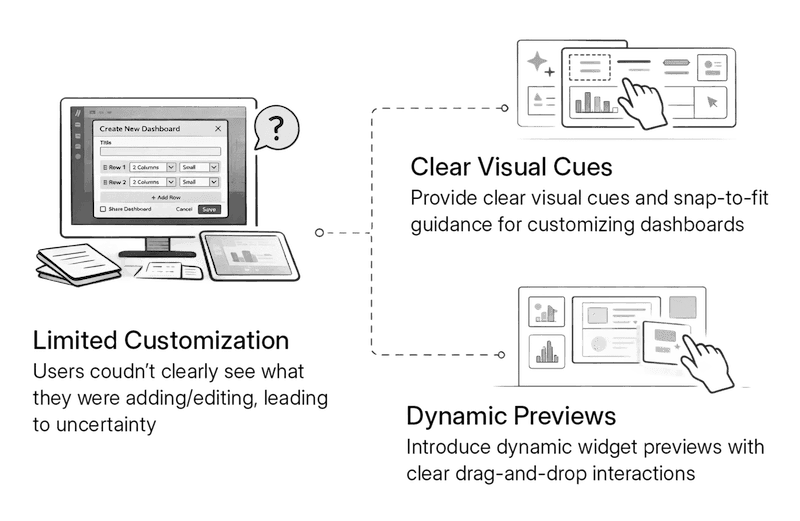
Through analysis of support tickets, internal feedback, and analyst interviews, we identified why dashboard customization was failing. Users couldn’t clearly see what they were adding or editing, and the lack of visual cues made changes feel uncertain. Once a layout was selected, there was no clear visual reference for how widgets were placed or updated, especially as dashboards grew larger.
As dashboards became more complex, layouts didn’t scale well, which slowed users down and led to drop-off in usage. Many users abandoned the tool altogether and relied on manual templates or external tools to regain control.
Design Exploration
I explored systems that handle customization well, drawing inspiration from iOS-style widget interactions to inform a more visual, confidence-driven desktop experience.
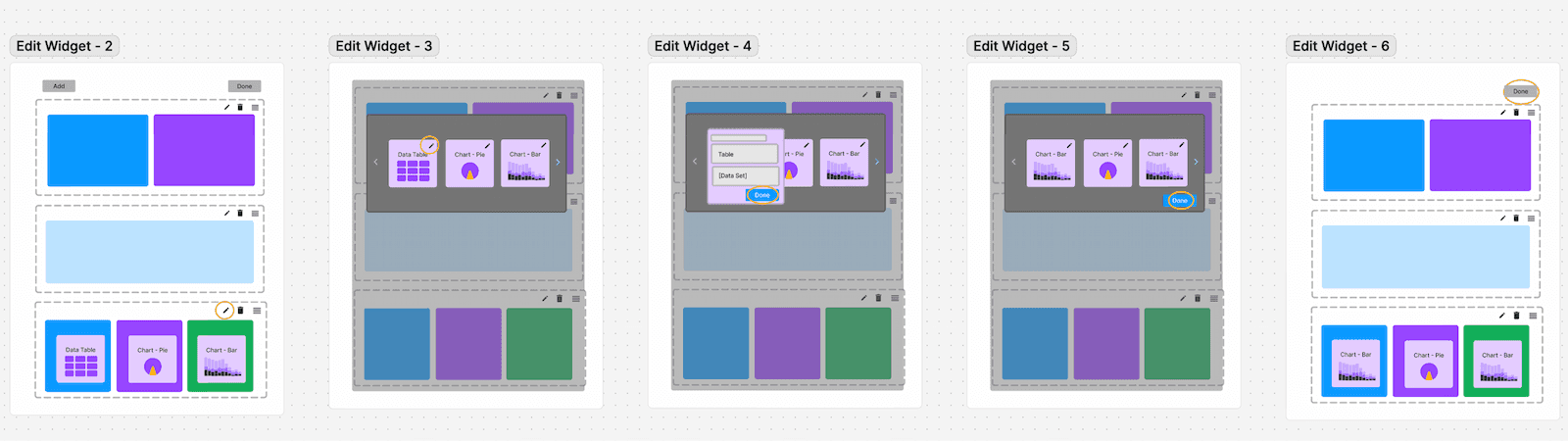
Section of wireframes exploring edit dashboard widget options.
Solution Overview
The redesigned, visually intuitive customization experience reduced support tickets by removing ambiguity around adding and editing dashboard widgets. Expanding the layout to better use desktop space allowed users to group related widgets within a single, meaningful viewport. Clear visual cues helped users understand available options, placement, and relationships between widgets as they built their dashboards.
Selecting widgets, adding, editing and reordering a row. e.g. 2/3 - 1/3 width.
Selecting widgets, adding, editing and reordering a row. e.g. 1/3 width.
Outcomes & Impact
With these cues built directly into the interface, users engaged more confidently with customization, better understood their tasks, and no longer needed to rely on manual templates or external tools. The result was higher adoption, reduced support load, smoother analyst workflows, and improved customer satisfaction.
Reflection & Growth
Looking back, this project reinforced how closely design clarity and business outcomes are linked. The customization tools were powerful, but without clear visual cues, users lacked confidence and avoided the feature altogether, driving support load and workarounds. I learned that validating interaction patterns early, even through quick testing, can help prevent costly rework and adoption issues later.
With more time, I’d explore smarter defaults, saved layouts, and track long-term usage trends to ensure the experience continued to scale as customer needs grew.